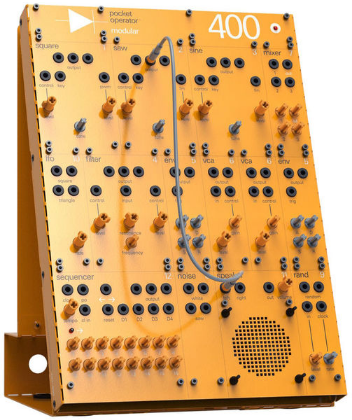
the pocket operator modular 16 is a sequencer with 16 slots, 4 tracks per slot and 1 pattern per track.
store up to 64 independant patterns, where each pattern can be up to 64 steps long.
the 16 slots are labeled by the numbers 1-16, which also represent keys on the keyboard.the 4 tracks are labeled T1-T3, as well as TK, where K stands for keyboard.
play notes and program patterns using the keyboard and use the knobs to control cv.
patch the cv / gate outputs to your other operator modular units or to any other compatible device.use po sync to synchronize pocket operators, and use the midi out to control any midi gear.
the unit auto powers off after five minutes of inactivity when powered from from batteries.
turn on the unit by flipping the switch towards the connector, and flip it back again for off. auto power offpower on / offpower your device using 4 x AAA batteries, or by using a power adater
when using batteries, we recommend using high quality rechargeable
batteries. you can also power the MK-16 from the power distro of a 170
or 400 with the included power cable.
turn knobs 1–16 to adjust
pitch. on the first three tracks (T1–T3) the cv output pitch for each
key (1–16) is determined by the corresponding knob (1–16).
the
pitch values of the knobs are separate for all tracks and patterns.
when switching tracks, the position of the knobs will not always
correspond to the current pitch.
to adjust a saved pitch value, turn the knob until it aligns with the actual value, to catch the value and allow adjustment.
the keyboard and midi out can be ordered according to one of four scales.
hold
trk and press 13-16 to select keyboard scales. on track 1-3 this will
set the knob cv values to selected scale. the scales affect the cv
outputs and midi. on the fourth track (TK) the keyboard overrides the
knobs. the scales are:
natural: white piano keys accidental: black piano keys chromatic: both white and black keys arabic: a type of arabic scale
press run to
toggle run mode and start the sequencer. the right led will blink in
time with the tempo, with a bright flash indicating step one. your
pattern will be playing and looping after the last step. press run again
to stop the sequencer.
to program a new
pattern, first, select the desired slot and track then press and release
program. the left led will light up to indicate program mode is
enabled. press keys 1-16 to program note steps into the pattern.
hold + or – and
press a note 1-16 to program using semitones. use oct and + or – to
offset octave and allow programming of notes across five octaves (-2 to
+2).
the default octave offset when entering program mode is 0.
when programming while in run mode, pressed notes are recorded live, potentially replacing existing notes.
the length of the programmed notes will be set to how long the key was held – in steps. minimum note length is 1 step and maximum is 4 steps. this can be changed later by editing the pattern.
holding clear while live programming will clear any pattern notes in time.
edit note length
in ticks by holding hold and + or – , or by holding hold and pressing
keys 1–16. there are 4 ticks per step. default note length per step is 3
ticks. minimum note length is 1 tick and maximum is 256 ticks. long
notes will add legato to following steps, meaning notes will jump
between each other until the initial note is finished.


-118x118.png "images")